Simple RGB LED Light Strip Remote Controller for SMD 5050 2835 3528 LED Strip Lights
$3.89$4.99
New
Description
About this item
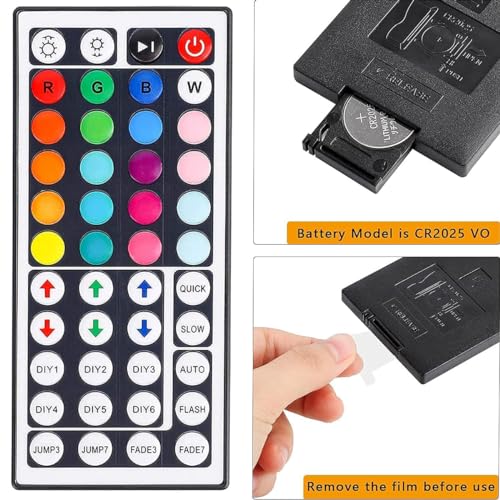
6 DIY keys allow you to freely adjust the R/G/B color. An infrared remote control makes it easy to control the LED RGB light strip.
You can adjust the brightness, turn the lights on or off, choose from 16 different multicolored options, and select from 5 light patterns including Static, Flash, Strobe, Fade-change, and RGB Smooth-change.
The LED light remote offers 20 colors and 5 light patterns: Static, Flash, Strobe, Fade-change, and RGB Smooth-change. It is easy to use, allowing you to turn the strip lights on or off, create DIY colors, and adjust brightness.
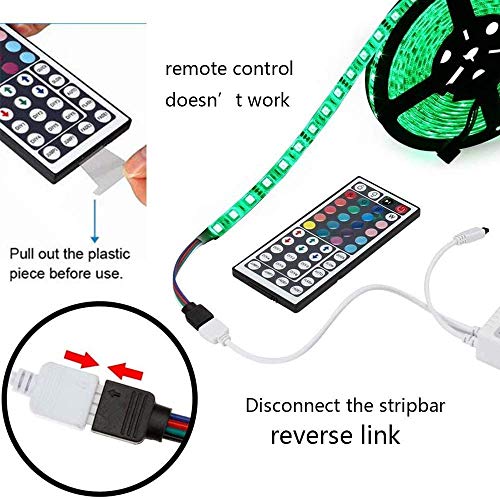
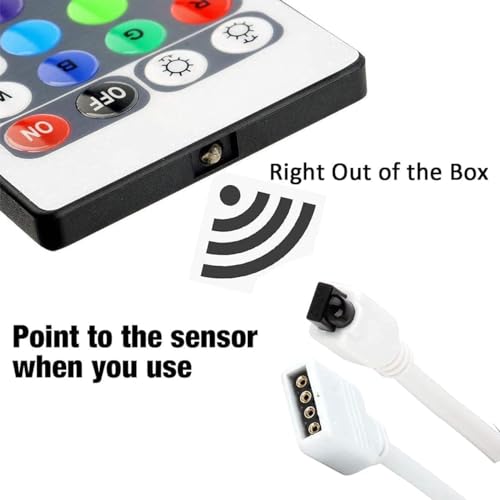
If the remote control is not working, first remove the plastic piece (see Figure 6). When using the remote control, make sure it is aligned with the indicating sensor (see picture 7). If it still doesn't work, try taking out the battery and reinstalling it (the battery may have shifted during transportation) (see Figure 6).
If the buttons are not controlling the correct colors, start by pressing the remote control switch button to turn off the light strip. Then press the FADE7 button (the last button below on the right) to make the light strip flash. Press the switch button to turn on the light strip, and the buttons should now control the correct color. If not, repeat these steps until they do.
The remote control is compatible with 5050, 2835, and 3528 model LED light strips. If it still doesn't work, please contact us and we will address the issue based on your specific situation.